
 Lessons: 16Length: 2.3 hours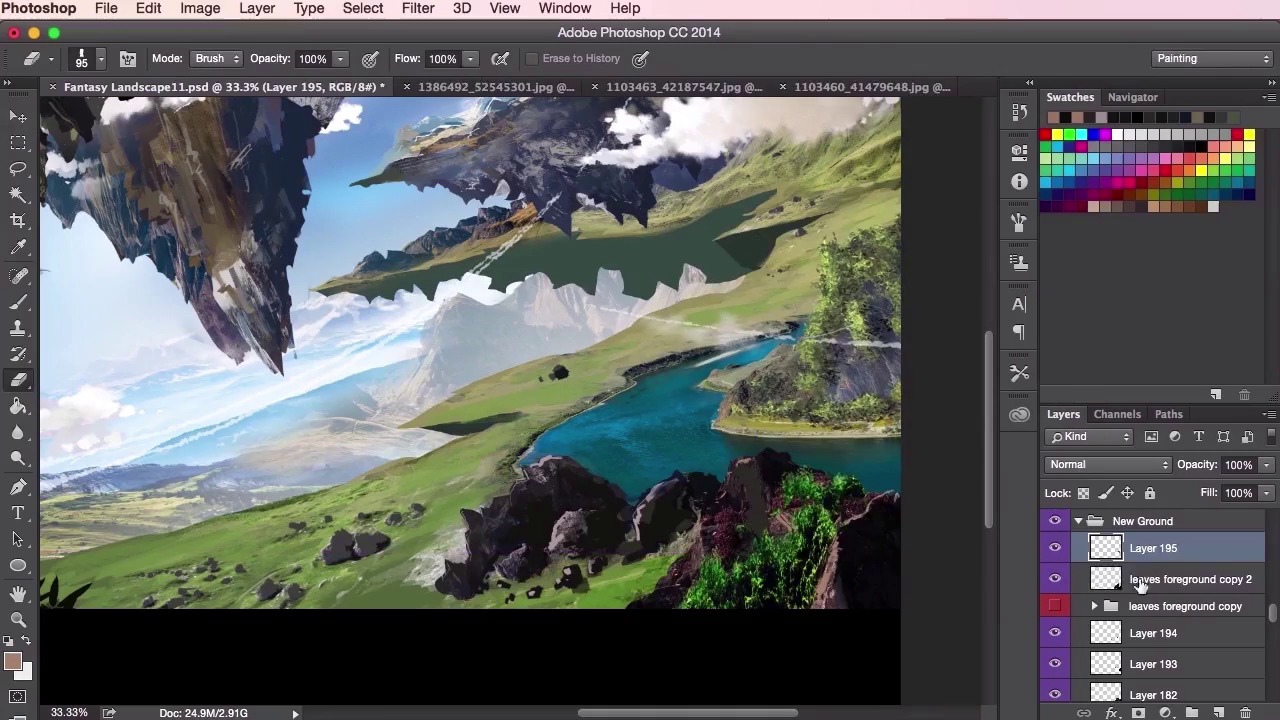
- Overview
- Transcript
3.8 Adding Detail
In this lesson you will go through a final summary of all the techniques in the course and how they have been used to create the final digital painting. You will learn how to add some final details such as grass and rocks to help sell the piece to the viewer.
1.Introduction
1.1Introduction01:31
1.2Adobe Photoshop Setup05:28
2.Shapes and Thumbnail Design
2.1Experiment With Shapes08:20
2.2Designing Shapes10:20
2.3Thumbnail Setup05:46
2.4Value Studies12:39
3.Painting
3.1Translating the Thumbnail08:19
3.2Initial Painting09:22
3.3Adding Texture08:31
3.4Design Development10:28
3.5Lighting and Colour10:19
3.6Clouds10:18
3.7Composition Adjustment10:56
3.8Adding Detail11:14
3.9Final Touches11:52
4.Conclusion
4.1Conclusion01:44
3.8 Adding Detail
Hey, guys. And welcome back to the concept environment course for games. Now in this video, we're gonna go through much of the same processes that we've already spoken about throughout the course. Such as adding detail to the painting, using your brush tools, and just general painting and textures. So, yeah, you'll be able to see in this video how I've implemented these techniques in the revised composition from the previous videos that you've seen. So, you can see starting off we made quite a drastic change to the composition, the last video. So I'm just going to have to reintroduce the painting and the textures again. Just by laying them down and finding the best composition for things, like this river, etc. Reusing bits of painting from the previous composition, and just to see if it can fit anywhere. So again, just, feeling it out and trying to get as many, reuse as many of the textures as we've done before, using the sow tool here, and again, the whole opacity and soft brush trick. It's, let's try and feel out how the mountains can help with the overall composition. So yeah, just not worrying too much about color yet. But, just want to lay down the structures and the, and the textures. So just trying to find some form of structure here. You can see already even though I haven't done much painting on the revised composition, you can get a much grander sense of scale with this, this land mass has come a lot closer to us now, and at the same time we can visualize how far away it is on the top right-hand corner. So now, just beginning to paint in some details. I wanna try and blend everything together now. Using the sew tool and pasting in some more textures, just trying to blend everything in So now, using the brush tool then the, just experimenting with, with other brushes now as well just to see if I can get more, paint some more texture in there. And you'll see I switched back and forth so I switch from this landmass here to structuring the composition with the clouds and zooming out and then zooming back in again. So I just wanna help use this solid square brush to just try and define these rocks a little bit more. Just give them a little bit more shape. Just trying to to find out if I can reuse some of these textures just to help me with the rocks down in the bottom right, here. Again, just thinking about colors, color picking them off the lighting, and the shading. And again, just going through all of my photographic reference to see if I can reuse anything there. So here you can see I've been using the razor tool set to the same brush as my brush tool, and then just kind of experimenting with twisting around the layers and finding what works. So, here I'm kind of happy with the rock structures here, I'm just gonna paint them. Add a few highlights there. It's all about blending it into the painting now. So always remembering your values, that bottom right rock was quite bright, so the values definitely wouldn't have worked with that one so, to bring it right down to an almost black value. Bring in some leaves which I previously painted from the old compositions, seeing if I could reuse some bits. And add a little bit more texture to the rock structure. What the leaves do, as well, is it helps bind everything together since they've already been painted on other elements of the painting. So now I'm going to give that massive shadow area here, just to give it a sense that this big floating island on top is floating on top of this area. Sorting my values again, zooming in, zooming out. Just checking to see if it works. You can use the values checker that we used previously to do that sort of thing as well. So here I'm just painting in the river, just giving it a more reflective surface here. Make it fit in with the rest of the painting a little bit more. And then just doing the same with the land as well, using the same techniques from before. Just painting in some rocks, just moving it around, seeing where it works, and where it doesn't work. Playing about with the opacity experimenting. And just general painting, fixing things up, fixing some edges. Making sure the contrast is well defined. And again, just trying to find some interesting shapes and textures and just going through what really works. So we're switching between placement, colors, painting, going through all my layers here, just to make sure that everything is working together, there is no sort of unnecessary fragments and blending which doesn't work. At this stage now, it's just tweaking and just having a play, seeing if there's anything more to add. I'm just tidying up my layers here, getting some, again getting the previous textures that I used before in the previous composition to help aid that sense of depth, that sense of closeness with the grass, the painted grass there. Just reusing them. And just going through all the soft round brush layers. Seeing if they're necessary. Going through the lighting now. So at this point, I want to try and really define that sense of depth so that the things that are really far away are really far away and the things that are close are quite close. So just tweaking the elements, checking my layers, tidying up the file now, it's a bit messy, there's loads and loads of layers which I don't know what's, what they're doing. And yeah, from there it's just a matter of just painting in some extra bits. I'm painting in some extra clouds here just to add a bit of atmosphere I'm transforming them, moving them around, stretching them, playing with the opacity. Just again, as usual, just seeing what works. So yeah, just playing about with the lighting, just making sure that the rays are working together with the rest of the painting. Moving the composition about a bit, making sure that everything is working together. And that's about it. So in the next video it will be our final video for this chapter. And we'll just be going through the final touches of what would really help sell the sense of scale and epicness to the painting. See you there.


