
 Lessons: 13Length: 1.9 hours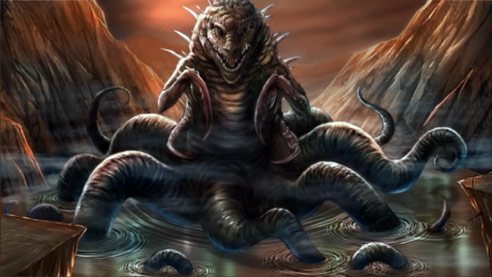
- Overview
- Transcript
1.1 Introduction
Welcome to How to Create Monster Art in Adobe Photoshop. In this course you will learn how to create detailed artwork in a way that allows you to make changes quickly and easily. You will learn how to use the layers and brushes to better create your painting effects. You will learn a variety of the selection tools that are available to you in Photoshop.
I will show you the methods that I use to pull ideas from animal reference photos to create better monsters. I will show you how to use textures to speed up your painting process and add more depth and realism to your work. I will then show you how to modify your work in shape and color with a non-destructive approach. We will then cover how and when to save elements of your monster paintings to speed up your future workflow.
1.Introduction
1.1Introduction01:15
1.2Tools and Resources01:20
2.Understanding the Tools We Will Use to Create Our Monster
2.1Understanding Layers and Brushes18:14
2.2Working With Selections to Control Our Effects11:21
3.Designing Our Monster
3.1Studying and Sketching From Reference to Create Our Creature Design11:32
3.2Blocking in the Overall Shapes of Our Painting15:35
3.3Painting in Light and Shadow to Give Our Monster Depth and Form15:39
3.4Using Liquify to Quickly Modify Parts of Your Illustration14:45
4.Refining the Artwork
4.1Adding in Detail and Textures12:59
4.2Creating Effects With Blending Modes04:19
4.3Adding Finishing Touches With Levels and Color Balance03:20
4.4Saving Elements of Your Painting to Enhance Productivity02:08
5.Conclusion
5.1Conclusion01:12
1.1 Introduction
Hello, everyone. My name is Robert Marzullo and I'll be your instructor in this course, how to create monster art in Adobe Photoshop brought to you by tuts+. In this course, I'll be showing you a variety of techniques that I use to create monsters and concept designs with Adobe Photoshop. This program is extremely powerful. I'll be covering a lot of the tools that make the character creation process a lot easier to accomplish. We'll cover things like the layers and brushes, how to use various selections to control our effects. I'll show you how to use different brushes to block in large shapes and add form to our creature. And then, I'll finally show you how to detail the work. We'll even cover how to use photo reference properly to incorporate design elements and variety into our monster illustration. So by the end of this course you'll have a stronger fundamental knowledge of Adobe Photoshop, and some of its very powerful features to create your effects. And you'll also have a better understanding of how to use those tools and effects to create your own monster designs from your imagination. So I'm very happy to be teaching you this course. Let's go and get started. Now let's head over to Chapter 1.2, Tools and Resources.


