
 Lessons: 12Length: 1.2 hours
- Overview
- Transcript
1.2 InDesign vs. Affinity Publisher
You have several options when it comes to choosing software for print design, but Adobe Indesign is the most popular.
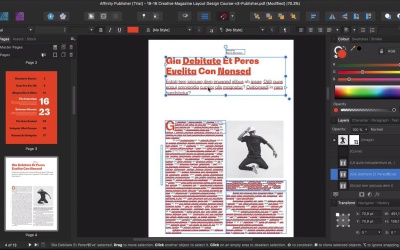
Adobe InDesign is the industry leader, but Serif, the company behind Affinity Designer, recently released their own publishing app, Affinity Publisher. In this Affinity Publisher review, we’ll take a look at the differences between Adobe InDesign and Affinity Publisher.
1.Introduction
1.1Introduction01:20
1.2InDesign vs. Affinity Publisher04:41
2.Getting Started
2.1The Essentials07:09
2.23 Ways to Create an Effective Workspace08:23
2.3The Structure of Your Document05:55
3.Design Elements
3.13 Foolproof Ways to Choose a Color Palette03:42
3.24 Typography Tips14:35
3.33 Essential Steps for Importing Images05:14
3.45 Ways to Create Impact in Your Design07:36
4.Printing
4.14 Steps to Get Your File Ready for Print04:26
4.2Exporting Files for Print05:01
5.Conclusion
5.1Conclusion01:59
1.2 InDesign vs. Affinity Publisher
Hi there and welcome back to this course. In this lesson we'll take a look at the differences between InDesign and Affinity Publisher. When it comes to Page Layout software's there are many the competition. There are refined software's that will let you combine typography, graphics and photo into books, magazine publications and flyers. But more importantly a good software will let you typeset typographically flawlessly. InDesign is the most popular software out at subscription base which can get costly quickly if you're a freelancer who's just starting out, or if you're a student. Affinity Publisher, on the other hand is a one time pay fee. For a single download and you're not tied to us expression. Affinity Publisher is from a company called serve. And this is the third program released with designers in mind. Affinity Publisher has an extensive catalog of screen sizes to choose from. You'll find anything including any of the iPhones and Apple Watch sizes to kindle and Nexus. Affinity Publisher puts web design at the forefront so you can design not only magazines but also anything that's web based. And this is because InDesign came out before web design was popular so it was built on a different foundation. When it comes to speed, Affinity Publisher is faster which makes a lot of difference if you're working from a laptop. So both software interfaces are quite similar and the same goes for functionality. If you used any of the other Affinity programs like Affinity Photo or Affinity Designer, Publisher might be easier to get used to. Affinity Publishers interface is essentially the same as InDesigns, and the tools panel is positioned on the left while the rest of the essential panels are docked on the right. The Pages panel is on the left side which in a way is great as it gives you more room to open up other panels on the opposite side. There are a few options in Affinity Publisher there aren't easy to find compared to InDesign or that take more steps to achieve. For instance, InDesign allows you to snap LMS to be aligned. Something that publisher doesn't do it automatically but it allows you to have as an option. In that case, you will have to go into the menu and try to find it. The color picker tool in this allows you to replicate not only color, but also text formats. And this is a huge time saver because it helps you work faster and efficiently. And if you're working with complex projects that include footnotes, then InDesign does a better job at that. Compared to Publisher. The Layers panel works a little bit different in Publisher. And this panel is essential in InDesign if you're working with either multilingual documents or creating templates. In Affinity Publisher, the Layers panel displays the objects of the spread you're currently working on, and not the entire document. When it comes to text, Affinity Publisher supports most of the text options from InDesign. But when it comes to paragraph and character styles, Affinity Publisher mixes both of them into a single panel. One great advantage of Affinity Publisher is the ability to use Affinity Photo tools to edit images. So let's say in InDesign you have to open Photoshop separately. Affinity publisher you don't have to do that. Tag accessible PDFs have become even more and more popular now, especially in government related publications and Affinity Publisher doesn't really support that. So InDesign is still on top of that. So Affinity Publisher is a solid software if you're planning to use it to set up basic layouts or getting started as a freelancer since it is budget friendly. InDesign is a subscription base so you would end up costing more but at the same time it is highly developed and sophisticated. So if you're a devoted InDesign user, Affinity Publisher will look a bit clumsy until you're used to it. In my personal opinion, I prefer using Adobe InDesign because I started out using QuarkXPress 15 years ago. And InDesign works perfectly for me in terms of creating layouts. It is also the most popular software, so when I need to share files with other designers or with a printer I won't run into any big problems. Now that we've looked at the comparison of these two programmes we're ready to start with this course. In the next lesson I will show you how to create a one page document, a trival share. And I'll walk you through the important components that you need to consider when setting up a new document in InDesign. I'll see you there.


