
 Lessons: 10Length: 1.6 hours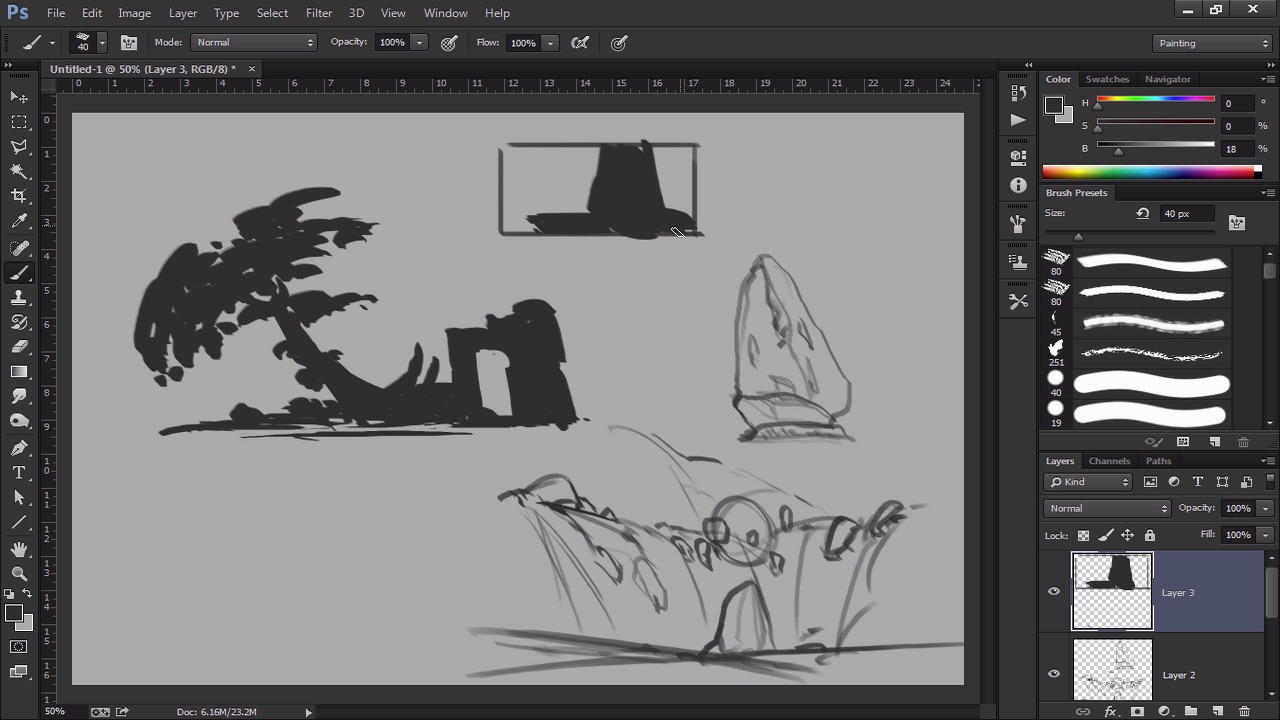
- Overview
- Transcript
1.4 Exploration Sketching
Now that we took a look at some references and inspirational art, we can now explore some of the ideas in our head using rough values and lines. In this phase, anything goes. So we can be as imaginative as we want, because we will not be showing these to a client. This is just a way to get the brain warmed up as we roughly sketch out random ideas based on our inspiration and reference images.
1.Introduction
1.1Introduction01:13
1.2Benefits of Thumbnail Sketching07:49
1.3Gathering References/Inspiration06:30
1.4Exploration Sketching11:22
2.Thumbnail Sketching in Adobe Photoshop
2.1Thumbnail Number 115:00
2.2Thumbnail Number 214:56
2.3Thumbnail Number 315:01
2.4Evaluation/Finishing Touches15:12
2.5Presentation04:49
3.Conclusion
3.1Overview01:43
1.4 Exploration Sketching
Okay, so let's get started with some exploration sketches just to get the brain going before we get into the thumbnail sketching. Before we kinda even go into that, let's just talk about Photoshop real quickly. I didn't talk about it before, but this is kind of Photoshop out of the package of what you see. You can customize it any way you want, it's really cool because you can always move around these kind of tabs, all that kind of stuff and customize it any way you want. So I highly encourage you at any point in time when you have some free time just to kind of tinker around in Photoshop a little bit and find a work space that works for you. So, by default, I use the painting one, depending on what you're trying to do. But painting is probably the best one, I think, because it has all my brushes right there, has the Layers, Channels, Path. All the things that I use on a daily basis and all my tools are on the right hand side. So, for right now we're probably just gonna use the brush tool. So, I'll give you guys my brushes so you guys can have those. I do have a lot of them and I apologize in the beginning. But as an environment guy you need a lot of brushes to save you time. But for the most part, I'll probably just be using like this brush and this brush, now nothing too crazy. Okay? If you don't know how to upload brushes, it's very very simple. All you have to do is just go to the brush option, click on your style list. And then you can just go right here in this little cog or the dialog box and then just go to load brushes, find the file and there you go. So let's get started, I'm just gonna start drawing anything and everything. You know? And so this is gonna be all over the place. And so you wanna think of this as a sketch book, it doesn't really matter if you're thinking in lines, thinking in value. It does not matter, if anything just start moving. I think that's probably the biggest thing that I see students kinda get caught up in. They're just like, what do I do, what do I do? Just start moving, just start thinking of something and just start going. Doesn't matter if it's cool or not, just again, start moving, start getting the brush going, and eventually things will figure itself out. And luckily I had some of that inspiration so now if I like something, I have kind of a good idea where it came from. So maybe there's like a bit of a architecture here. I'm just kind of erasing, so, I like to erase a lot because it kind of paints negatively too when you use the eraser tool. So you get some of these weird things that happen. So I'm just imagining this is kind of like a tree or something. All right, that's cool. And then maybe, So I'm just painting these little again just think of it like a sketchbook. You're just writing ideas out, that's all you can really do at this point. And I'm just kinda going here. So I have no idea what it could be, if it's even cool or not, but again, this is for me. Again, most of the time actually, I don't even show people these things because they're so rough. But again, it's very imperative for me to get to the final result. Otherwise, if I just kinda go for a final painting right off the bat, it's very unlikely. So the cool thing about this too is that I can always move this around and I can start something completely new. It doesn't really matter, so let's actually do that. Let's start something new and maybe this time, I'll use lines. So I'm gonna use a brush that's kind of better for lines and I'm just gonna start drawing something. And again, that's kind of the cool part about Photoshop or what I kinda wanna get across in this class is just the freedom just to do whatever you want. I don't want you guys to feel constrained or feel like you have to do it my way, that's totally not the case. You can do it the way that definitely fits you. My job is to just kind of show you different ways to approach it and then you guys can kind of pick the best one that suits you. So there's definitely no right or wrong answer to all this stuff, you know what I mean? So I'm thinking of like a rock and there's a waterfall and there's some kind of floaty thing around it. And again this could be a bad sketch. It could be a crappy sketchy. It could be a good sketch. I have no idea, because I didn't plan it. And that's the beauty of it, is that we're just letting our brain just work. And so we already looked at some reference. We already looked at some inspiration and so now we're just gonna just let that happen, so there you go. And maybe, this idea right here, I kind of want to think about that some more. So maybe I can go in here and think about that sketch a little bit more in detail. So now I'm kind of just sketching it a little more just so I can understand it better. And again just kind of sketching some ideas out, nothing too crazy. And even sometimes I'll even put a bounding box on mine. So, that's a kind of cool idea, but not really. I even put a bounding box on mine sometimes just to kind of help me understand where is it gonna be at the composition. So again, if you're having trouble, just work small. If if it's not working out for you just work very, very small. If you can work small and keep it to like two or three values in between, it's gonna make your job a lot easier. So notice here how small I'm working, is because I'm trying to figure some things out so I only have a couple of different values. And so if I can kind of make this read right in this small small little sketch, when I go into that thumbnail it should be a lot easier. So it's exactly what I'm banking on here, so you'll see me do a lot of these. It's probably one of my favorite ways to design, is think of small little thumbnails like this. And it kind of this helps me get some ideas up and I'm just thinking about the form the composition. And then sometimes, if I want to, I can go back in here later on and then really kind of design some things out. And so notice I jump around a lot as well. This is kind of important to me because I don't wanna feel constrained to one idea. And so that's why it's really important that your learn to kind of work on multiple at the same time. When it comes the thumbnailing stage I do you work at one at a time. But here it's like, I treat it like a sketch book so my ideas are kind of like, it's almost like I have ADD. My ideas are just jumping over at any point in time and at any time I can, something could spark an idea within me and I just go with it. So again, you don't have to show these to people. It's not necessary, but it's definitely imperative, in my book, when you get to that final painting. All this stuff helps you get there a little bit with more ease. So I think some of some of the misconceptions, as we see these awesome paintings, all these popular websites and everyone thinks oh, well probably just did it that one time and it was just awesome. Well no, actually a lot of times they do a bunch of these little sketches and they work on that painting for a good while before they even finish it off. Because they're trying to figure out the ideas here first, learn to get that graphic read, learning to get some of those ideas out. So let's keep going, let's do maybe one more. And I kind of like where that one was going a little bit, so let's actually do one more. This time I'm actually just gonna fill it in. Little bit of a darkness here, now let's just see. And granted, it's a little bit messy, and that's totally okay, you wanna be able just to feel free. So if you're feeling constrained on Photoshop, then you gotta stop and be a little more loose, okay? So I don't want you to do this and then you're like, oh man, I'm feeling constrained or whatever, definitely don't feel that way. Again, the great thing about Photoshop and doing this digitally instead of doing it in your sketchbook, is that at any point if you don't like it, just delete it, right? You just take that drag it into the trash can and you're done and it never happened. And you didn't waste too much time on it as opposed to a sketch book, you make about drawing it's kind of stuck there unless you throw it away. But here you can always take things out and that's kind of the great thing about it. So don't feel constrained, the sky's the limit, do whatever you want. So I'm just gonna put in some, So I kind of have this fantasy theme going on, so I just wanna keep going with that, maybe even put in a little more values here. And so we'll do one more and then I think after that, we're gonna start with the thumbnail and we're gonna start getting the sketches going. And then we're gonna just see where it goes from there. But hopefully all this preplanning, all this getting the inspiration, doing these small little sketches are things that are gonna help us later nail that final drawing. It's gonna help us get where we wanna be so. Let's do one of those. You know what? Oh, okay. See, sometimes it just happens like that where an idea comes, and then you totally didn't see it coming, but then you're like, oh snap, that totally works. And then you just roll with it, and that's the beauty of it, is that I don't know what's gonna happen and neither should you when you're doing these sketches. It should just kinda be very much like pure creativity, there shouldn't be an expectation out of it. It should just be very, very fun, and just different, it should just be whatever you want it to be. So this actually kind of, like the forms that are happening here. I kind of want to put like a castle on there or something if possible. So I'm gonna use a square brush here and kind of work that around. And again there's no expectation, if it works out great. If it doesn't who cares. I didn't spend that much time on it. I can always go again. And at that point it's kind of a numbers game, you know what I mean? Working efficiently and that's exactly what I want for you guys. So, maybe it will have like a little bit of something like that, like a cool castle or something. Yeah, screw it. All right, so there we go so we'll leave that one there and I kinda like that idea, we might go with that. And the biggest thing, too, about this is that I'm not married to any design, you know what I mean? So that means, let's say I wanna go with this sketch from my next thumbnail, I don't have to do this. It's just an idea, it's just a guide, but I can always stray away from it at any point in time. So I can do whatever I want, I'm not married to any design, I'm not not tied down. At any point in time, if something else kind of sparks my creativity, I can make those changes so, and there we go. So those are some exploration sketches. Again we some reference, got some ideas, now let's get into the the meat and potatoes of this lesson and let's start drawing. Let's start making some nice production thumbnail sketches that we could probably show to a client or show to a boss. Okay, all right guys, I'll see you then.


