Learn 3D design with our free tutorials

Bring your ideas to life in three dimensions with our 3D design tutorials. From modeling to animation, we'll help you create amazing visual experiences.

All 3D Design tutorials:

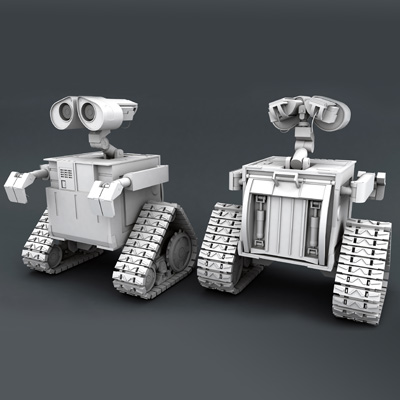
  1. Recreating Pixar's Wall-e in High Poly Using Maya 2012: Part 19

    Recreating Pixar's Wall-e in High Poly Using Maya 2012: Part 19

    Tutorial Beginner

    Today we're wrapping up one of the most ambitious tutorials we've ever published, as we bring you the final part of the Wall-e modeling series for Maya. Over...

  2. Create 3D Letters Without the Use of 3D Tools in Adobe Illustrator

    Create 3D Letters Without the Use of 3D Tools in Adobe Illustrator

    Tutorial Beginner

    Follow this new quick tip and learn how to create simple 3D letters without the use of the 3D effects. We will start from a simple font and after a few...

  3. Create a Game-Ready Fire Extinguisher With 3D Studio Max: Part 2

    Create a Game-Ready Fire Extinguisher With 3D Studio Max: Part 2

    Tutorial Intermediate

    Learn how to create a game ready fire extinguisher with 3ds Max and Photoshop in this five part series.

  4. Simulate a Champagne Bottle Pop with Realflow

    Simulate a Champagne Bottle Pop with Realflow

    Tutorial Beginner

    New Year's Eve is just around the corner and lots of Champagne bottles will be popped. Alongside that, lots of us will be asked to pop virtual Champagne...

  5. Quick Tip: ZBrush Fibermesh to Maya Hair

    Quick Tip: ZBrush Fibermesh to Maya Hair

    Tutorial Intermediate

    In this quick tip, you'll learn how to export Fibermesh from ZBrush and import it into Maya for use with Maya's hair system. Shaun covers export settings,...

  6. Create an Animated Holiday-themed Background

    Create an Animated Holiday-themed Background

    Tutorial Intermediate

    In this holiday-themed tutorial, you'll learn how to create a great looking animated winter background of falling snow. Starting in illustrator, you'll...

  7. Quick Tip: How to Set Up Units & Use the Tape Tool in 3D Studio Max

    Quick Tip: How to Set Up Units & Use the Tape Tool in 3D Studio Max

    Tutorial Beginner

    In this quick tip, Alex Martin introduces you to two features of 3D Studio Max that many new artists overlook, a correct unit setup and the ever handy tape...

  8. Create a Game-Ready Fire Extinguisher With 3D Studio Max: Part 1

    Create a Game-Ready Fire Extinguisher With 3D Studio Max: Part 1

    Tutorial Intermediate

    Learn how to create a game ready fire extinguisher with 3ds Max and Photoshop in this five part series.

  9. Quick Tips for Rendering Animations with Cinema 4D

    Quick Tips for Rendering Animations with Cinema 4D

    Tutorial Beginner

    In this quick tip, Aleksey Voznesenski will go over how to render out animations from Cinema 4D, and discuss things like aspect ratios, the pros and cons of...

  10. Recreating Pixar's Wall-e in High Poly Using Maya 2012: Part 18

    Recreating Pixar's Wall-e in High Poly Using Maya 2012: Part 18

    Tutorial Beginner

    So here we are in part 18 and Wall-e's nearly complete and looking good! The only thing left to do is finish up the back portion to complete the model. In...

  11. Create a Realistic Shark in Maya using Subdivision Surfaces: Part 3

    Create a Realistic Shark in Maya using Subdivision Surfaces: Part 3

    Tutorial Intermediate

    In the third and final part of the series, you'll take the completed shark model and make it animation ready by building a complete rig for the model....

  12. Quick Tip: Create a Batch Script to Render Maya Scenes

    Quick Tip: Create a Batch Script to Render Maya Scenes

    Tutorial Beginner

    In this quick tip, Shaun Keenan introduces you to Batch Script Generator, a great free script for creating batch render files for Maya. These allow you to...