
 Lessons: 18Length: 2.3 hours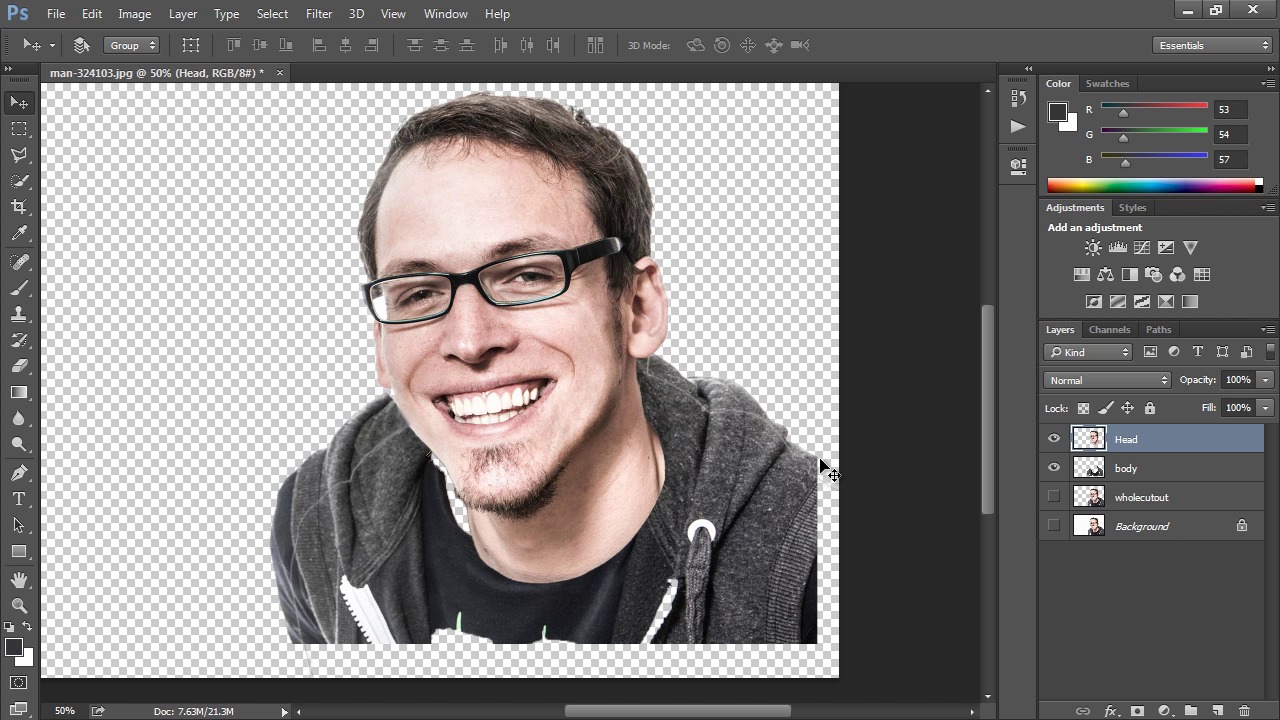
- Overview
- Transcript
2.2 Layers and Selections
Here we'll use some basic selection tools to isolate elements of the portrait and transfer them to individual layers to use in the caricature.
1.Introduction
1.1Introduction03:00
1.1
Introduction
03:00
1.2Tools and Resources03:26
1.2
Tools and Resources
03:26
2.Setting Up the Project
2.1Project Planning07:37
2.1
Project Planning
07:37
2.2Layers and Selections08:21
2.2
Layers and Selections
08:21
3.Mastering Transformations
3.1Transformations Overview12:12
3.1
Transformations Overview
12:12
3.2Transformations Practice Project06:49
3.2
Transformations Practice Project
06:49
3.3Application: Rough Transformations06:42
3.3
Application: Rough Transformations
06:42
4.Mastering Warps
4.1Warps and How They Work07:49
4.1
Warps and How They Work
07:49
4.2Exploring Puppet Warp07:50
4.2
Exploring Puppet Warp
07:50
4.3Practice Warp Project06:12
4.3
Practice Warp Project
06:12
4.4Application: Warping the Caricature Form06:31
4.4
Application: Warping the Caricature Form
06:31
5.Liquify
5.1The Basic Liquify Tools08:07
5.1
The Basic Liquify Tools
08:07
5.2Advanced Liquify Tools09:35
5.2
Advanced Liquify Tools
09:35
5.3Liquify Practice Project08:52
5.3
Liquify Practice Project
08:52
5.4Liquify Application: Exaggeration of Features12:08
5.4
Liquify Application: Exaggeration of Features
12:08
6.Finalizing the Caricature
6.1Color Adjustments09:42
6.1
Color Adjustments
09:42
6.2Final Effects13:47
6.2
Final Effects
13:47
7.Conclusion
7.1Conclusion01:45
7.1
Conclusion
01:45


