
 Lessons: 19Length: 2.1 hours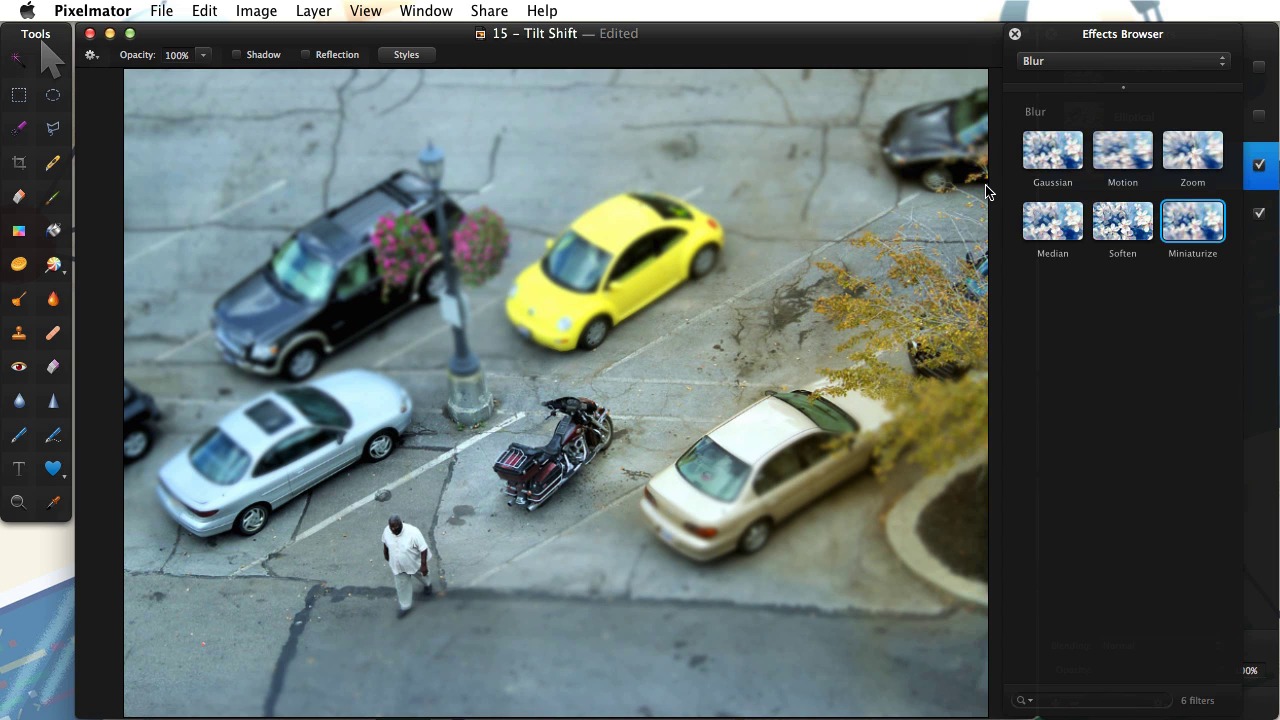
- Overview
- Transcript
6.1 Tilt Shift
In this lesson we’ll learn how to leverage the Miniaturize Filter to create a tilt-shift effect.
Related Links1.Welcome
1.1Welcome01:07
1.1
Welcome
01:07
2.Advanced Brushes in Pixelmator
2.1Understanding Brush Settings11:49
2.1
Understanding Brush Settings
11:49
2.2Creating Dynamic Brushes07:11
2.2
Creating Dynamic Brushes
07:11
2.3Image Brushes in Pixelmator09:06
2.3
Image Brushes in Pixelmator
09:06
2.4Working with Brush Sets06:17
2.4
Working with Brush Sets
06:17
3.Pixelmator Text Treatments
3.1Text Masks05:38
3.1
Text Masks
05:38
3.2Text and Filters07:36
3.2
Text and Filters
07:36
3.3Displacement Effects06:50
3.3
Displacement Effects
06:50
4.Retouching With Pixelmator
4.1The Repair Tool08:46
4.1
The Repair Tool
08:46
4.2Working with Skin09:10
4.2
Working with Skin
09:10
4.35 Ways to Sharpen Your Images06:28
4.3
5 Ways to Sharpen Your Images
06:28
5.Compositing
5.1Clipping Masks03:14
5.1
Clipping Masks
03:14
5.2Creative Compositing08:29
5.2
Creative Compositing
08:29
5.3Transformations06:04
5.3
Transformations
06:04
6.Creative Effects in Pixelmator
6.1Tilt Shift07:46
6.1
Tilt Shift
07:46
6.2Toning04:41
6.2
Toning
04:41
6.3Halftone07:04
6.3
Halftone
07:04
6.4High Dynamic Range (HDR)07:21
6.4
High Dynamic Range (HDR)
07:21
7.Conclusion
7.1Final Thoughts00:52
7.1
Final Thoughts
00:52


