

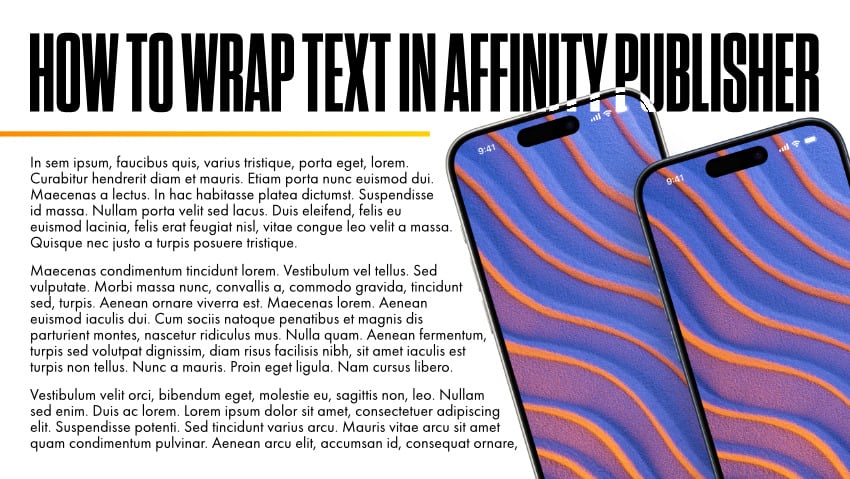


Affinity Publisher can wrap text around an image and automatically factor in transparency in the image. Learn how to break up boring, blocky layouts by enabling text wrapping in Affinity Publisher.
Download the assets used in this tutorial on Envato Elements:
1. Open Your Image in Affinity Publisher
Ensure your image has a transparent background, and import it into Affinity Publisher with File > Place. I have a PNG file prepared, but you can also edit the photo in the Affinity Photo persona. The wrap text settings will respect any layer mask created in the Photo persona.


2. Wrap Text Around the Image in Affinity Publisher
Select the image, (not the text) and click the Show text wrap settings button at the top. Select Tight to have Affinity Publisher wrap text as close to the opaque part of the image as possible.


3. Adjust the Wrapped Text Around the Image
With the Text Wrap Settings still open, fine-tune the position of the image and use the Distance from text settings to ensure there are no awkward islands of text. Then close the Text Wrap Settings menu when you're happy with the result


Now You Know How to Wrap Text Around an Image in Affinity Publisher!
Now you know how easy it is. Simply move the image or the text box as needed, and the wrap will continue to automatically reformat the text so that it wraps around the image.


Discover More Affinity Publisher Tutorials
Here are more awesome resources and videos if you'd like to learn more about Affinity Publisher. From a complete course to specific tutorials, you'll find plenty of resources on Tuts+:


 Affinity Publisher for Beginners


 How to Create a Stylish Magazine Layout in Affinity Publisher


 15 Tips & Tricks All Affinity Publisher Users Should Know

 A to Z of Affinity Publisher: Tips, Tricks, and Hacks


 Affinity Publisher Tutorial: How to Use Affinity Publisher to Import InDesign Files

 How to Create a Table of Contents in Affinity Publisher
 By
By



